Cornucopia
Quick expense logger
Three seconds to record what you spent
Now on Google Play
Overview
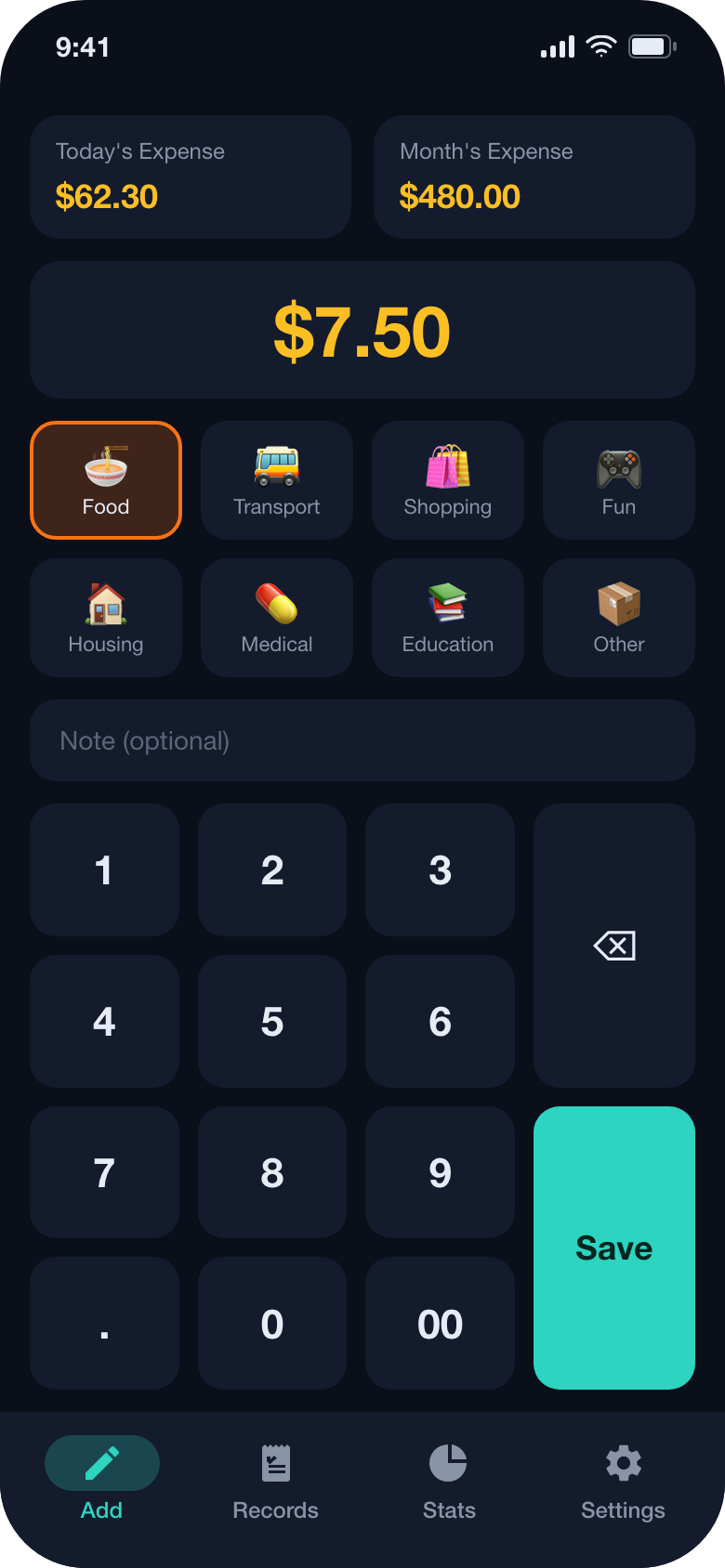
Cornucopia is a deliberately incomplete spending app. It records expenses and nothing else: no income, no transfers, no accounts, no budgets, no multi-ledbook switching. That narrowness is the feature - the first screen you see is the entry pad, so noting a coffee costs you three seconds and no navigation.
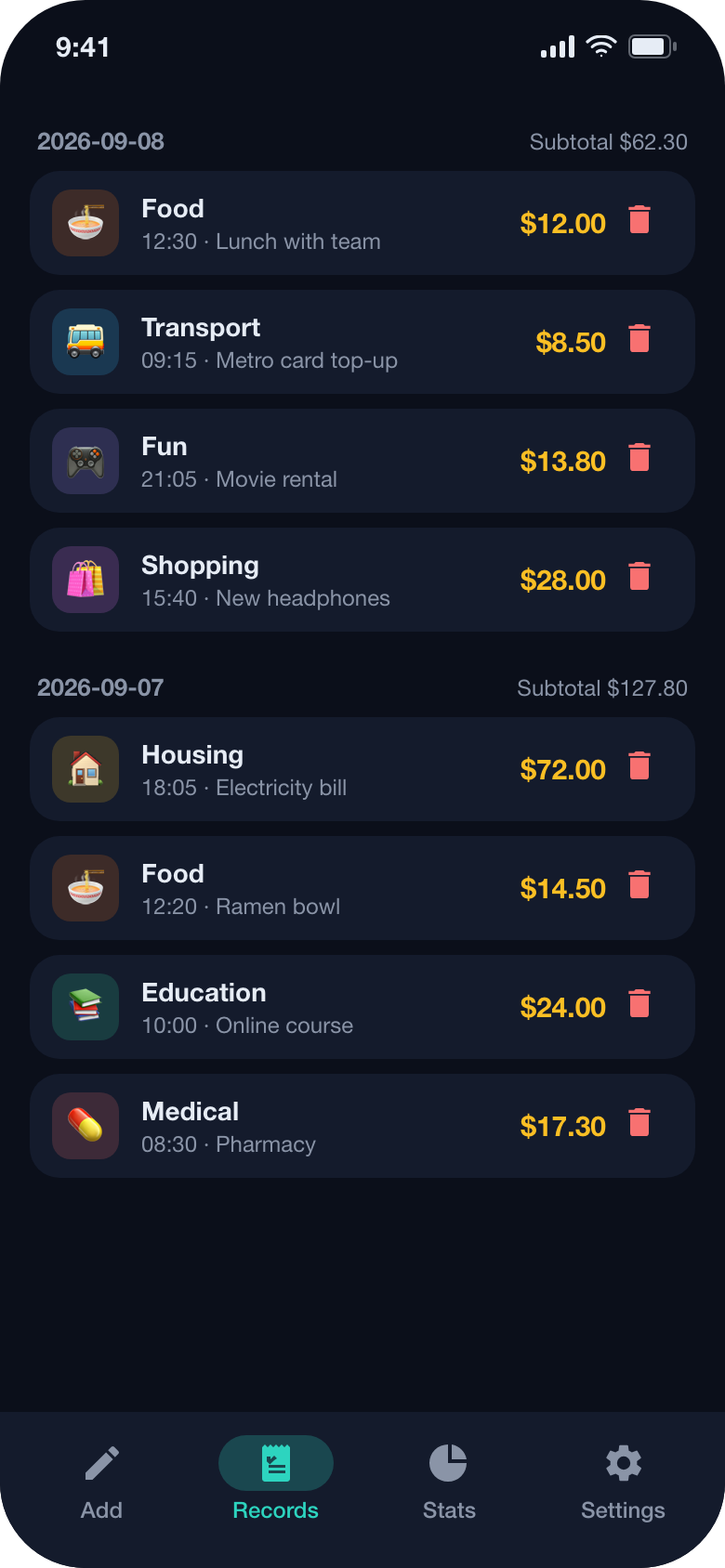
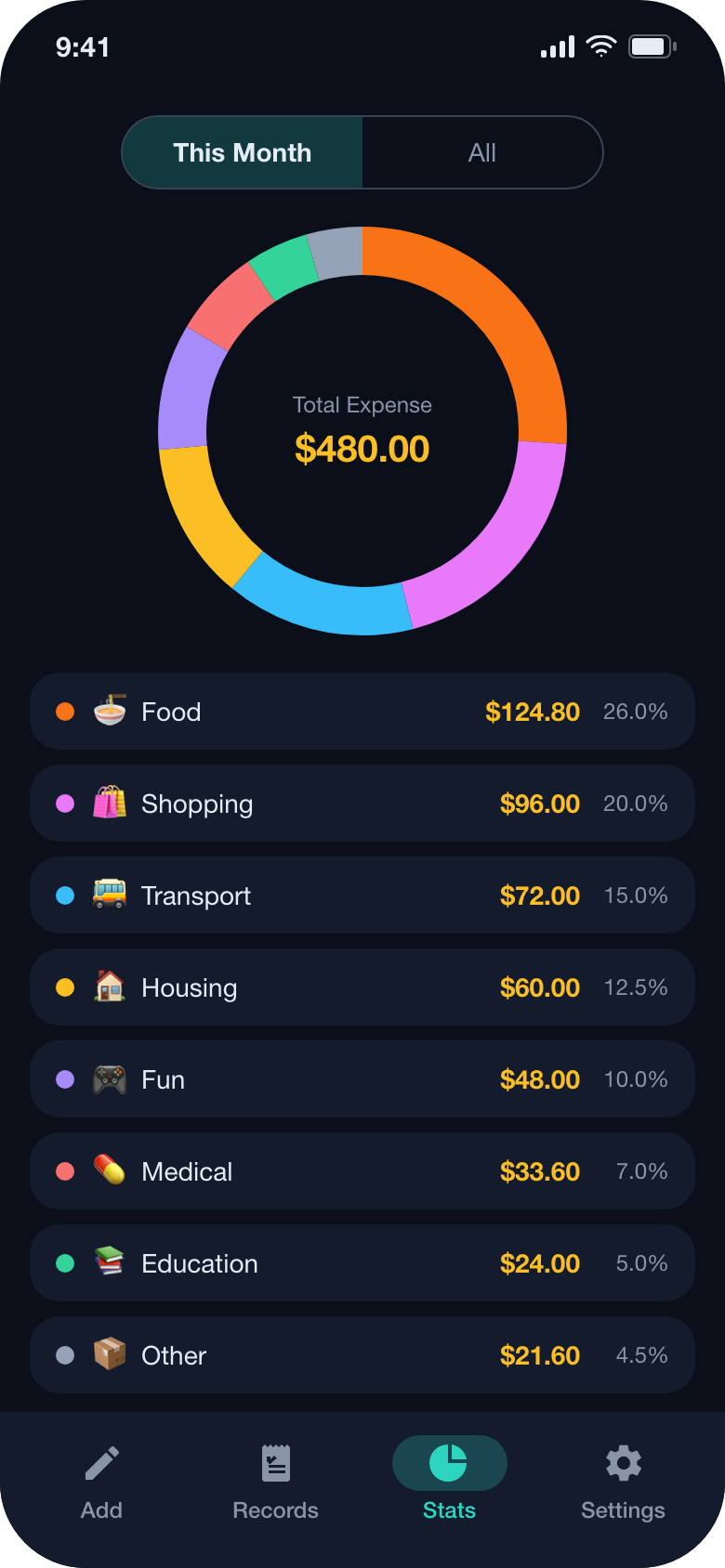
Below the pad, today's and this month's totals sit permanently in view; the ledger tab groups your entries by day with a subtotal for each day, and the statistics tab draws a category chart with the option to include everything since the first entry. Records live in a local database and can leave the phone only when you export them yourself.
Screenshots
Screenshots on this page show the current interface of the application with sample entries, created on this website to illustrate the product.
What it does
A keypad, not a form
The entry screen is a numeric keypad with 00 and backspace, eight emoji categories and an optional note of up to thirty characters. The amount grows as you type; saving returns you to the ledger.
Today and this month, always visible
Two summary cards sit above the keypad so the running total is the first thing you see, without opening another screen to check it.
A ledger grouped by day
Entries are listed newest first under a date header with that day's subtotal, each row showing its category, time, note and amount, and you can delete an entry straight from the row.
Category chart, this month or all time
A hand-drawn donut chart splits your spending across the eight categories with amounts and percentages, switchable between the current month and everything you have recorded.
Your currency and your language
Amounts are formatted with the currency symbol inferred from your locale or language, with thousands separators and two decimals, and the interface can be switched between six languages inside the app.
Backups you initiate
Export your records as a JSON file through the system share sheet or save it to a file you choose; import restores a backup after asking you to confirm that existing records will be replaced.
Free with ads, one purchase to remove them
The free version is supported by an interstitial advertisement between sessions. A single in-app purchase removes the advertisements permanently on your store account.
Details at a glance
- Platforms
- iPhone and iPad (iOS 15.0 or later), Android 7.0 or later
- Languages in the app
- English, Japanese, Korean, German, French, Chinese - switchable inside the app
- Where your records live
- A local database on the device; nothing is uploaded
- Account required
- No
- Pricing
- Free version with an interstitial advertisement; a one-time in-app purchase removes the advertisements
- Category
- Finance - personal spending
Privacy and your data
Cornucopia keeps only what it needs to show you a number: the amount, the category, an optional note and the date and time of each entry, plus your language and purchase settings. Everything is stored in a database file on your device. We do not run a server that receives your entries, so we cannot read them, and uninstalling the app deletes them.
The free version shows an interstitial advertisement served by Google AdMob. Advertisers may use an advertising identifier, which you can reset or limit in your operating system settings, and the one-time purchase removes the advertisements. Purchases are completed by the App Store or Google Play; we receive only what is needed to recognise that you bought it.
Questions and answers
Why is there no income, transfer or budget feature?
Because adding them would cost the thing the app is for: speed. Cornucopia records expenses only. If you need accounts, transfers and budgets, a full finance suite is a better fit, and we would rather say so than half-build one.
How do I restore my purchase on a new device?
Sign in to the device with the same store account you bought on, then open the settings tab and choose Restore purchase. The store confirms the entitlement and the advertisements stop.
Is my data sent anywhere?
Your records are not. They stay in a local database and leave the device only if you use the export function yourself. The only network traffic in the app comes from the advertisement in the free version, which the purchase removes.
How do I move my records to a new phone?
In settings choose Export data and save or share the JSON file, then use Import data on the new device and select that file. Import replaces the records already on the device after asking you to confirm.
What happens to my notes if I delete an entry?
Deleting an entry removes it and its note from the device permanently; only a JSON backup exported before the deletion can bring it back.
Who do I contact if something is wrong?
Email contact@yingzhichu.com or call +86 18515331983 during business hours, mentioning the app version, your device and operating system. Exporting a backup and attaching it lets us reproduce the problem exactly.